Romestead Best Seeds & Starting Locations
Last updated: 2026-08-22
Every Romestead world is generated from a seed you set when you create it — and because the seed decides where the desert, forest, lake and volcano fall around your spawn, a good one can make the whole early game smoother. Here's what actually makes a seed good, how to preview one before you commit, how to find your current world's seed, and why hunting for a better spawn costs you nothing.
Your character carries across worlds — talents, skill XP, Favour Points and gear all persist when you start a new world. So rerolling for a better seed is basically free: you lose only the settlement, never your character. Don't agonise over your first map.
On this page
The Autumn Update ships over 30 new dungeons plus World Generation updates (including a fix for weird desert entrance generation), and Beartwigs states plainly that you are required to create a new world in order to see them.
Two consequences for this page. First, any seed shared before August 31 is version-locked — the same seed number may well generate a different world after the update, so treat pre-update seed reports (including the community example below) as historical. Second, this is the moment the whole "just reroll" argument on this page stops being a curiosity and becomes the recommended play: everyone is starting a fresh world anyway, so you may as well roll until you get a spawn you actually like.
What a world seed is
When you create a world (after making your character), Romestead asks you to configure a seed along with world parameters. That seed feeds the game's world generator, which lays out the same structure every time for a given seed and world size:
- A central spawn, with a ring of the key biomes around it — forest, desert, lake, and volcano.
- Volcanic tendrils reaching inward, rivers, and an ocean border at the edges.
Same seed = same map. That's what makes seeds shareable: paste in someone else's seed and you get their world.
What makes a good starting seed
Forget chasing a "perfect" seed code — what you actually want is a spawn with the right things close together. Prioritise:
| Look for | Why it matters |
|---|---|
| Plains right at spawn | Wheat only grows in the Plains — it's the backbone of feeding your settlement. You want flat Plains farmland on your doorstep. |
| Multiple biomes nearby | A central spot bordering forest + desert + lake means short trips for wood, copper/tin, clay and water instead of long hauls. |
| Water / river / clay access | Rivers power the Watermill and clay (near water) feeds the Pottery / olive-oil chain. |
| A reachable desert | The desert gates Tin → Bronze and later bosses. Closer = faster progression. |
| Defensible ground | Cliffs, water, or chokepoints near your build site cut down the angles raiders can hit you from. |
The spawn point isn't always the best base site. Scout a short distance for a central location that touches the Plains and a couple of other biomes, then settle there. A few minutes of scouting beats hours of cross-map hauling later. See the Build Order for what to place first once you've picked your spot.
How to read a seed (seed map viewers)
You don't have to gamble on a seed blind. Community seed map viewer tools take a seed (and world size) and render the exact biome layout in your browser using the game's own world generator — so the volcano, desert, lake, forest and ocean appear where they'll actually be in-game. Before committing to a long run, it's worth previewing a seed this way to confirm the Plains, water and desert sit where you want them relative to spawn.
Note World generation can shift between Early Access patches. A seed that produced a great map last month may generate a slightly different one after a worldgen update, so re-check a shared seed against a current-build map viewer before relying on it.
How to find your current world seed
Want to share your world, or note a good one down? Two ways to retrieve the seed:
- Chat command: press Enter to open chat and type
.worldseed(include the leading dot). - Console: pause, hold F4, click MISC to enable the console, press \ (backslash), then type
.seedand press Enter.
Entering a custom seed
At world creation you can type in a specific seed rather than taking a random one — that's how you load a seed someone shared. A few pointers:
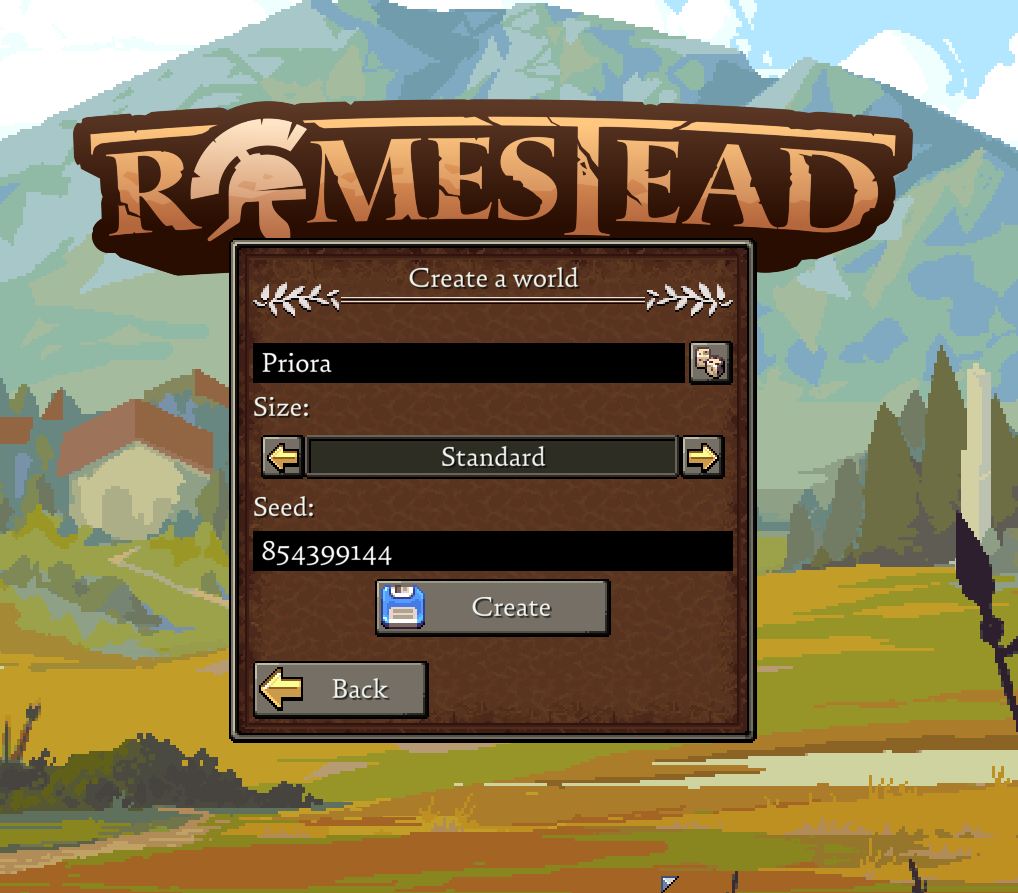
- Match the world size the seed was shared for; the same number on a different size won't reproduce the same layout.
- One community-shared example that's circulated is
1755746100, noted for a cliff-ringed desert reachable by heading southeast from spawn along the main road. Treat any specific code as version-dependent — preview it on a current seed-map viewer before starting a long run. - Because your character persists, you can spin up a custom-seed world, scout it, and reroll if it's not what you wanted — no real loss.
Wait — did you mean crop seeds?
"Seeds" in Romestead can also mean the things you plant. Quick reference, since crops are biome-locked:
- Wheat Seeds — Plains only. The staple for bread; see the Food guide.
- Mint Seeds — Plains, Swamp, or Forest. Cheap to grow and a strong Ceres worship offering (see the Gods guide).
Each seed's tooltip states its allowed biomes — plant outside them and nothing grows, often with no obvious error.
Common questions
What's the best seed in Romestead?
There's no single "best" — the best seed is one with Plains at spawn and several biomes (forest, desert, lake) nearby. Use a seed map viewer to find one that fits, and remember worldgen can change between patches.
How do I see my world seed?
Open chat (Enter) and type .worldseed, or enable the console (pause → hold F4 → MISC) and type .seed.
Can I enter a custom seed?
Yes — type a seed at world creation. Match the original world size for the layout to reproduce correctly.
Do I lose progress if I reroll for a better seed?
Only your settlement. Your character keeps all talents, skill XP, Favour Points, gear and carried inventory across worlds, so rerolling is low-cost.
Can you terraform or flatten terrain in Romestead?
No — Early Access Romestead has no terraforming, so you can't raise, flatten or dig the ground. You build on the terrain as it generates (buildings are single-click placements that snap to the existing surface), which is exactly why your spawn and seed choice matter so much. Terrain editing — things like carving little ponds or rivers — is a popular community request that may arrive later with the roadmap, but it isn't in the game today. For now, pick a seed with the flat, well-placed ground you want rather than planning to reshape it.