Romestead Carpenter Guide
Last updated: 2026-08-22
The Carpenter is the workshop that turns your raw Lumber into the planks, carts and structures the rest of your settlement runs on — and it's also the building that physically constructs everything you place. If your queued buildings just sit there as ghostly outlines and never get built, the Carpenter (and one easily-missed toggle) is almost always the reason. Here's everything it does and how to keep it working.
On this page
What the Carpenter does
The Carpenter's Workshop has two jobs, and that split confuses a lot of new players:
- Crafting — converts Lumber into Wood Planks and builds wooden items (carts, the War Table, target dummies, torches, buckets). These come out of the building's order queue like any other workshop.
- Constructing — the assigned carpenter walks out to your queued building placements (the translucent "ghost" outlines) and physically erects them. Nothing you place gets built until a carpenter is set to Constructing.
A carpenter can only do one of these at a time, which is the root of most "why isn't anything happening" confusion — see the next section. From August 31, 2026 a third job joins the list: repairing constructions.
The "Constructing" toggle — why your buildings aren't being built
This is the single most common Carpenter problem. You place a House or a workshop, the outline appears… and it never finishes. The fix:
Open the Carpenter, find the assigned worker, and set their job to Constructing ("Order the carpenter to build construction sites"). They'll leave the workshop, walk to your queued placements, and build them in order. When the queue is empty, switch them back to crafting planks.
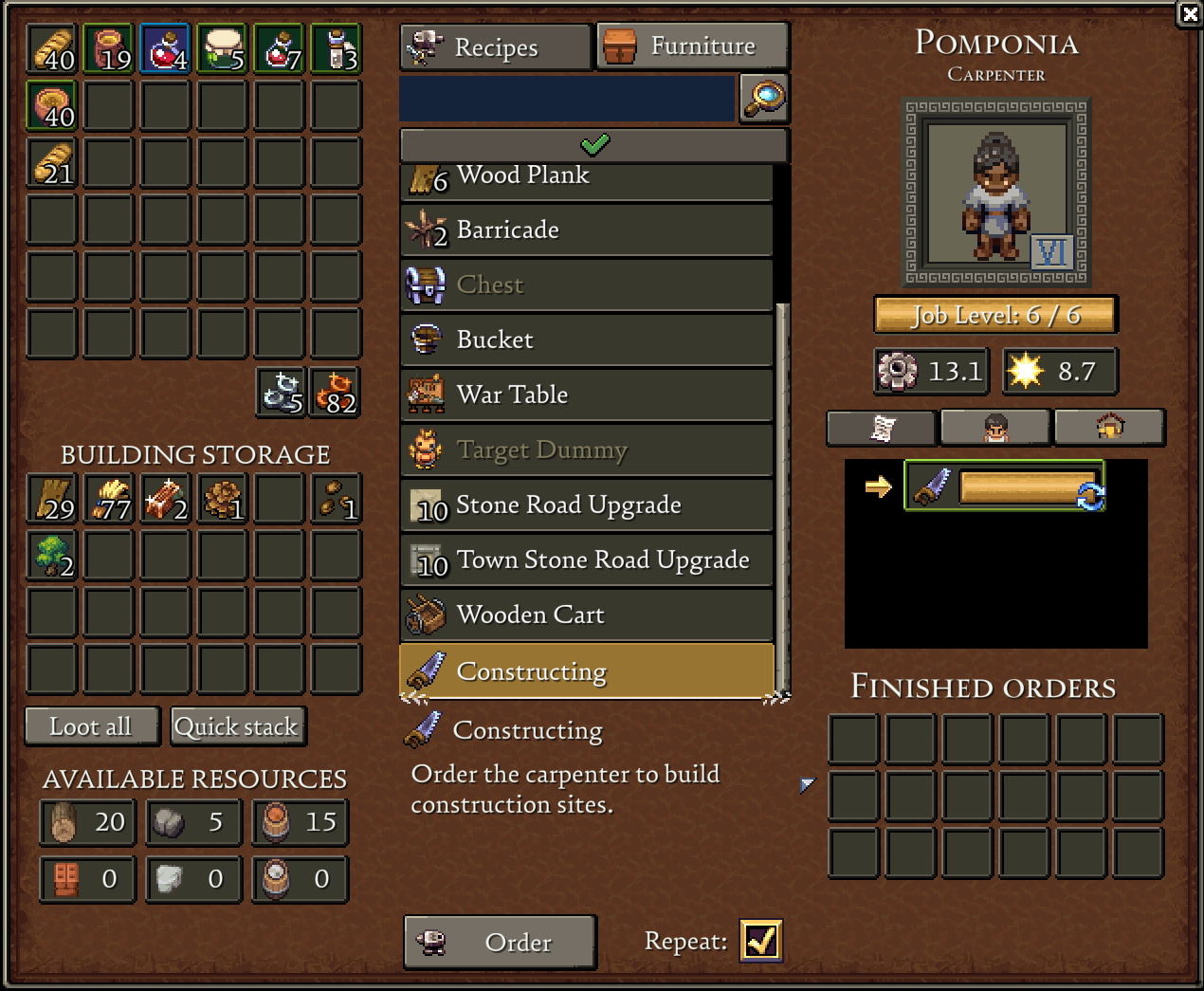
Things to know about Constructing:
- A carpenter who is crafting planks is not constructing buildings, and vice-versa. If you need both at once, assign two carpenters (or build a second Carpenter's Workshop).
- Construction still consumes the placement's required materials — if the build needs Wood Planks or Stone and you don't have them in reach, the carpenter will stall at the site.
- The carpenter has to be able to physically path to the build site. Placements walled off behind water, cliffs or other buildings can leave a worker stuck.
Carpenter recipes
Everything the Carpenter crafts starts from Lumber (and the Wood Planks it makes from Lumber). Exact secondary costs are still being confirmed in Early Access; the table below reflects what's observed in-game.
| Item | Cost | What it's for |
|---|---|---|
| Wood Plank | Lumber | The core intermediate — consumed by almost every other recipe and most building upgrades. |
| Wooden Cart | 12 Wood Plank | Holds up to 4 resources and chains with other carts to haul multiple resources at once. Early-game automation that exists before the Logistics Tent. See our Automation guide. |
| War Table | 8 Wood Plank + 1 Leather/Hide | Used to create declarations of war against the "trespassers of Rome." Player-initiated combat. |
| Target Dummy | 3 Wood Plank (+ materials) | "A target dummy to test attacks against." Practice your weapon timing safely. |
| Torch | 2 Lumber | Night-time light source. Also the cheapest perimeter deterrent for early raids. |
| Bucket | (cost TBC) | "Used to carry water, clay and other liquids." Needed for water-dependent tasks. |
Note Wood Planks are the backbone of the whole early economy — the Carpenter is rarely idle. If you're constantly short on planks, that's your signal to upgrade the workshop or add a second one.
Keeping it fed: Lumber & Material Storage
The Carpenter doesn't gather its own wood. It's supplied Lumber by your Material Storage building, which acts as the hub for raw, carried materials (logs/lumber, stone, ore, clay). If your Carpenter is sitting idle with orders queued, check that:
- You have a Material Storage building placed and stocked with Lumber.
- A Woodcutter is actually felling trees and the lumber is reaching storage. A Woodcutter starting class speeds this up early.
- The Material Storage is close enough that haulers keep the Carpenter topped up.
Lumber is a carried item, not an inventory item — it won't go in ordinary chests. That's why Material Storage exists. Full rules in our Storage guide.
Job Levels & upgrades
The carpenter working the building has a Job Level (shown as e.g. 1/3), which appears to cap at 3. Higher Job Levels unlock better recipes and faster work, the same +3-per-tier system that gates other workshops. The Carpenter's Workshop itself can also be upgraded as a building, which is the hub for unlocking later construction options.
The full upgrade math — the +3-per-upgrade rule, Building Appeal, and the Carpenter's role as the upgrade hub — lives in our Building Upgrades guide. For where the Carpenter fits in your opening sequence, see the Build Order.
Coming August 31: the Carpenter repairs constructions
Beartwigs has confirmed that in the Autumn Update, releasing August 31, 2026, the Carpenter will now help repair constructions. It's one line in a patch note, and it's the most consequential change to this building since launch.
Here's why it matters. Constructions — walls, gates, barricades, Scorpio turrets — are what the Fallen chew through during a night raid. Repairing them has been manual player work, which means the practical cost of a raid isn't just the damage, it's your morning spent patching a perimeter instead of playing. A Carpenter that maintains your defences automatically turns that from a chore into a background process, in exactly the way the Logistics Tent did for hauling.
The obvious knock-on is that the Carpenter's job-slot pressure gets worse. A carpenter can only do one thing at a time, and repair looks like a third competing job alongside Crafting and Constructing. If you run a single carpenter today, budget for a second one around the update — and note that carpenters already have an effective working radius from their building, so a workshop placed at the edge of a sprawling settlement may not reach the walls you most want maintained. Placing the Carpenter's Workshop centrally is about to matter more than it does now.
We'll confirm the specifics — whether repair is a separate toggle, whether it consumes materials, and what the range actually is — once we've played it. Everything above the callout is from the official announcement; this box is our read.
Common questions
My carpenter won't build the houses/workshops I placed. Why?
Almost always because no carpenter is set to Constructing. A carpenter busy crafting planks won't build placements. Toggle one worker to Constructing, or assign a second carpenter to do both jobs in parallel. Also confirm you have the materials the placement needs and that the site is reachable.
Why is my carpenter idle with orders in the queue?
It's out of Lumber. The Carpenter pulls Lumber from Material Storage — make sure a Woodcutter is supplying logs and a Material Storage building is placed nearby and stocked.
Can I have more than one Carpenter?
Yes, and it's often worth it. One carpenter crafting planks while a second handles Constructing keeps both your plank supply and your build queue moving at the same time.
Do I need Wood Planks or Lumber for building upgrades?
Wood Planks. Lumber is the raw input; Planks are the refined material most upgrades and recipes actually consume. Keep the Carpenter converting Lumber → Planks ahead of demand.